Claude Cowork vs Claude Code: Which One Should You Use? (2026)

Claude Cowork vs Claude Code: Which One Should You Actually Use?
You opened the Claude desktop app and there are suddenly three tabs.
Chat, Code, and now Cowork.
You just want to get work done, and instead you’re stuck guessing which one to point at your task.
I build AI agents with Claude Code every day, and I use Cowork too, so let me save you the guessing.
Here’s the one-sentence answer before you scroll any further: Cowork and Claude Code run on the same engine, and the only real question is where it runs and what you’re producing.
The rest of this is the detail behind that sentence, including the money reality that most comparisons skip.
Key Takeaways
- Same engine, different steering wheel: Cowork and Claude Code share the same agentic core and the same Claude models. The difference is where they run and who they’re for.
- Claude Code lives in your terminal. It’s for building software and repeatable systems, with full control and the power to run commands, manage git, and build things that run again and again.
- Claude Cowork lives in the desktop app. It’s for knowledge work like documents, spreadsheets, and reports. No terminal, easier, safer, but it can stall on the most complex multi-step jobs.
- You’re already paying for both. Both are included on every paid Claude plan, from Pro up to Max. Higher tiers buy more usage, not more features.
- The rule of thumb: if the output is software or a system that runs on its own, use Code. If the output is a finished document, use Cowork.
The One-Sentence Difference: Same Engine, Different Steering Wheel
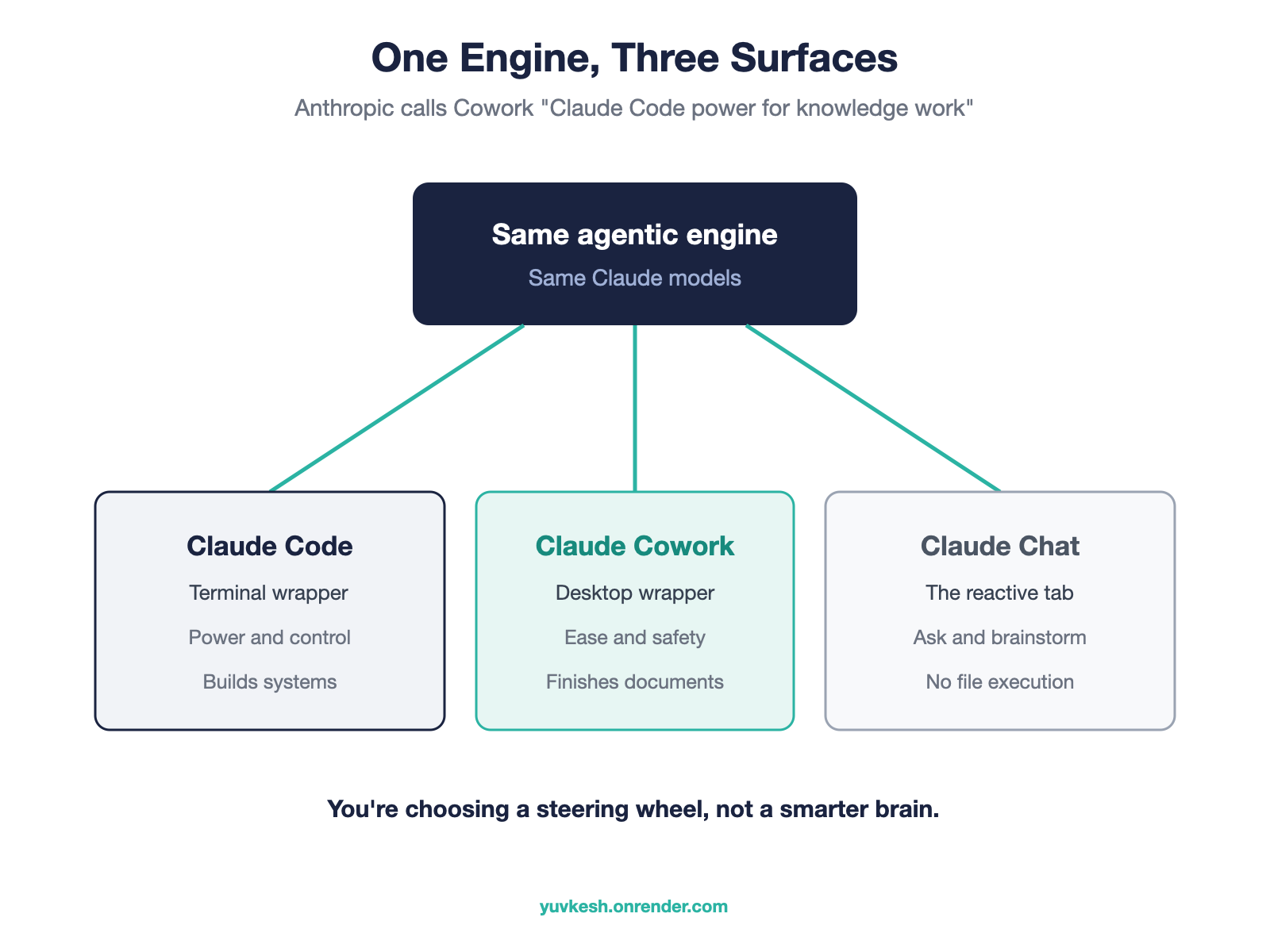
Cowork and Claude Code are the same agentic engine wearing two different wrappers.
Anthropic doesn’t hide this.
They literally position Cowork as “Claude Code power for knowledge work”.
Read that again.
The tool built “for non-developers” is the developer tool with the terminal taken off and a friendly desktop cover put on.
So the question people ask first is the wrong one.
Nobody needs to know which is smarter, because they run on the same models.
What actually matters is where the agent runs and what you’re trying to produce.
Code hands you the steering wheel and the whole engine.
Cowork wraps that same engine in a car with power steering and a speed limiter.
What Is Claude Code? The Developer’s Power Tool
Claude Code is Anthropic’s agentic coding tool that runs in your terminal.
It reads your files, runs commands on your machine, manages git, runs tests, and builds systems that keep running after you close the laptop.
It became generally available in May 2025, and it now runs at a scale most software companies never reach.
Anthropic said its run-rate revenue passed 2.5 billion dollars a year by February 2026, more than double where it started the year.
Here’s a concrete example from my own work.
I build agents that pull a client’s meeting transcripts, summarize each one, and file the summary into a knowledge base every morning, with no human touching it.
That’s not a document you make once.
That’s a system that runs on a schedule, and that’s the kind of thing only Code can do.
The honest tradeoff: all that power cuts both ways.
Code can make real changes fast, which is a gift right up until it’s a problem.
Serious use depends on a git safety net and the habit of reviewing changes before they ship.
What Is Claude Cowork? The Knowledge Worker’s Agent
Claude Cowork is the desktop agent for everyone who doesn’t live in a codebase.
You point it at a folder, describe an outcome, and it plans and executes the steps.
“Organize these files.”
“Draft a report from these notes.”
“Build me a spreadsheet with working formulas from this data.”
It arrived in early 2026 and was built for non-developers: analysts, legal teams, finance people, operations.
Here’s a concrete example.
You drop a folder of twelve messy expense PDFs on it and ask for a clean summary spreadsheet, and it reads all twelve, extracts the numbers, and hands you a finished file.
The honest tradeoffs go the other way from Code.
Cowork is easier and safer, because it runs in an isolated virtual machine walled off from the wider internet.
But it burns through your usage quota faster, because a lot of hidden work happens behind that simple interface.
And on the most complex multi-step jobs, it can stall where Code holds up.
Claude Cowork vs Claude Code: The Head to Head
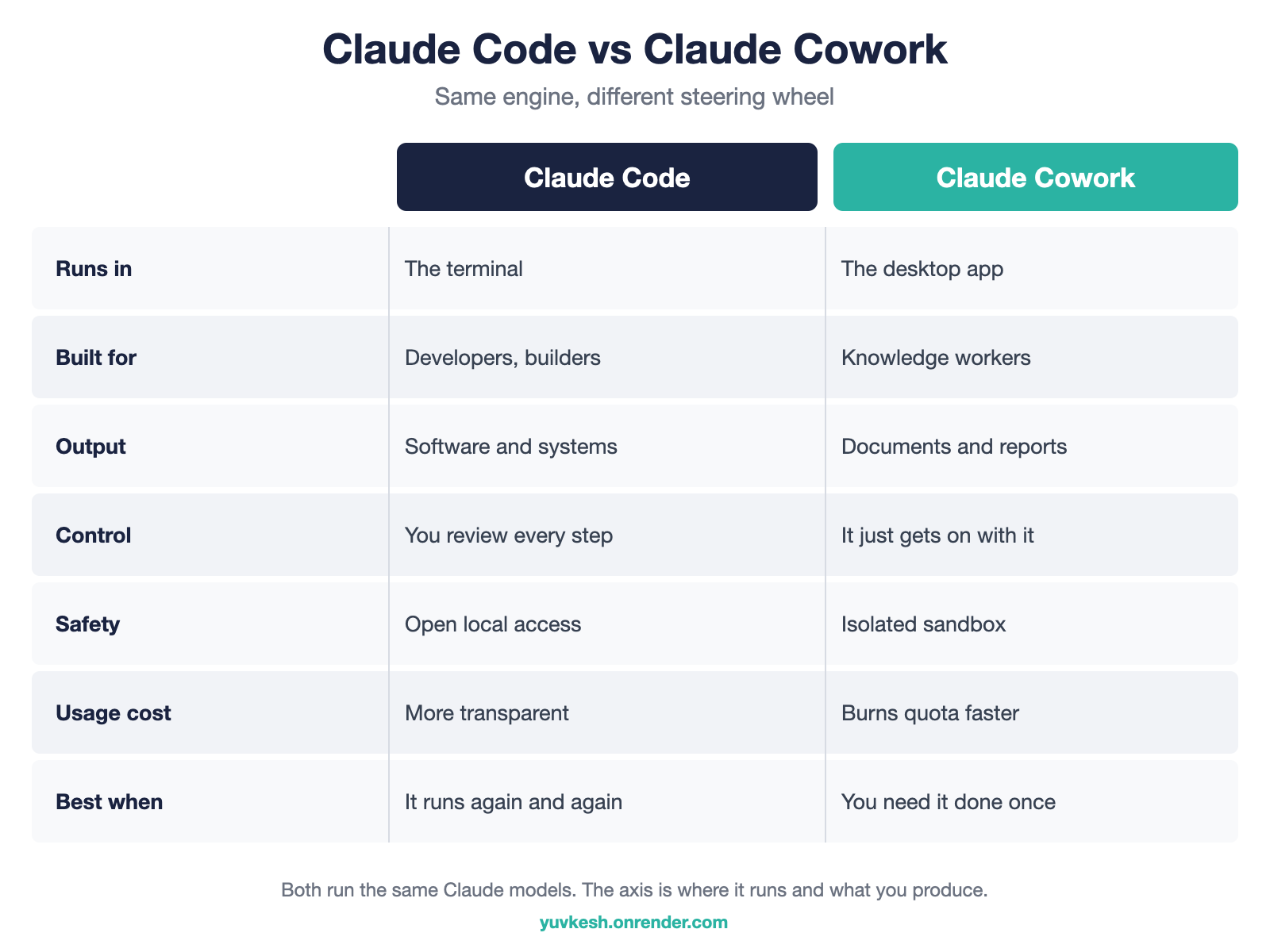
Here’s the comparison that every other guide turns into a giant table.
On interface: Code runs in the terminal you set up yourself, and Cowork runs inside the desktop app with nothing to install.
On who it’s for: Code is for developers and builders, and Cowork is for knowledge workers.
On output: Code produces software and systems, and Cowork produces documents, data, and reports.
On control: Code shows you every step and every change to approve, and Cowork just gets on with it.
On safety: Cowork runs in an isolated sandbox, and Code has open access to your machine, which is more powerful and less protected.
On usage: Cowork tends to eat your quota faster, and Code is more transparent about what it’s spending.
On hard tasks: Code holds up longer on long, complex, multi-step work, and Cowork can stall.
Notice what’s not on that list.
“Which is smarter” isn’t there, because they use the same model.
Which One Should You Use? Decide by Your Output
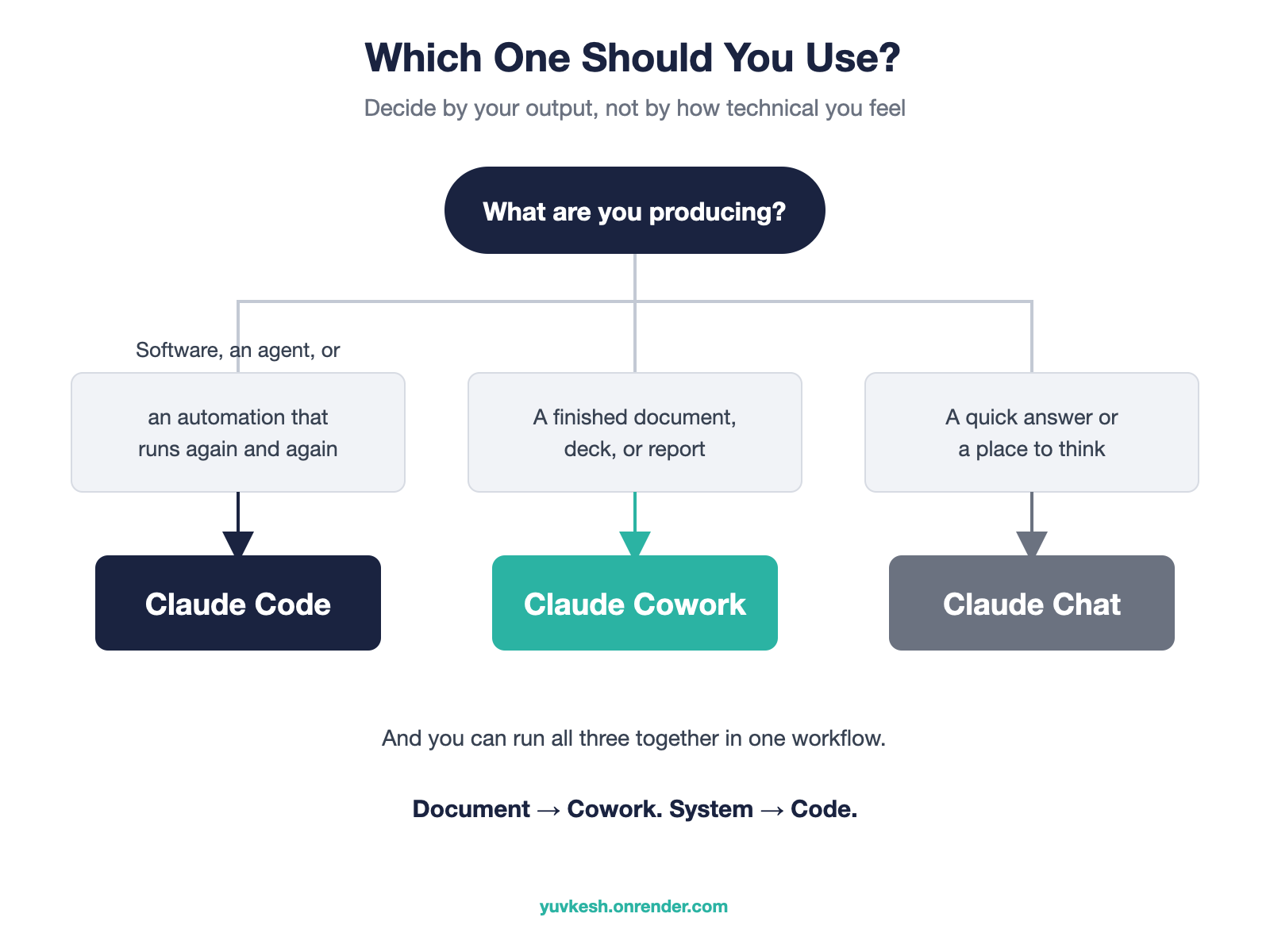
Forget how technical you feel.
Decide by what you’re producing.
If the output is software, an agent, or an automation that needs to run again and again, use Claude Code.
If the output is a one-off document, a dataset, a deck, or a report, use Claude Cowork.
If you just want a quick answer or a place to think out loud, use Claude Chat, the third tab.
And you don’t have to pick only one.
A lot of teams use all three at once.
Chat for design thinking, Code for building the actual product, and Cowork for the business and operations work around it.
If you want the deeper version of the “runs again and again” case, I wrote a full guide on running AI agents in the cloud 24/7.
Pricing: Are You Paying for Both? Yes
This is the part the top-ranked comparison leaves out entirely, and it’s the thing people actually worry about.
You are not paying twice, and you are not missing features on the cheap plan.
Both Cowork and Claude Code are included on every paid Claude plan.
That starts at Claude Pro, around 20 dollars a month, and goes up through Max at 100 or 200 dollars a month, plus Team and Enterprise seats.
The models are the same across all of them.
The only thing a higher tier buys you is more usage, not more features.
So Pro is not a “lite” version of Cowork or Code.
It’s the full thing with a smaller monthly allowance.
One nuance worth knowing: because Cowork does more hidden work per task, it can chew through that allowance faster than the same work in Code.
If you hit limits, that’s usually why.
Can a Non-Developer Actually Use Claude Code? Yes, Here’s How
Here’s where I’ll say the thing most comparisons won’t.
More people should learn Claude Code, including people who have never written a line of code.
The only real wall between you and Code is the terminal, and that wall is shorter than it looks.
You drive Code in plain English, the same way you drive Cowork.
You already trust the engine, because Cowork is that same engine.
Skills and simple setup handle the parts that used to require a developer.
I teach non-technical operators to build with Claude Code, and the ones who get past the black screen stop asking “can I do this” within a week.
So here’s an honest starting path.
If all you ever want is a finished spreadsheet or a report once a week, stay on Cowork, and don’t let anyone shame you into the terminal.
But the moment you want something that runs on its own, that repeats, that becomes a system instead of a task, that’s your signal to open Code.
Cowork is the training wheels.
Code is the whole bike.
That’s the difference between renting a simplified version of this technology and actually owning the most general tool of this era.
If you want to see what non-technical people are building with it, that’s exactly what my community does every day.
The Bottom Line
Cowork and Claude Code are the same engine with two different steering wheels.
Pick by what you’re producing, not by how technical you feel.
If it’s a document, Cowork.
If it’s a system, Code.
And whichever you reach for first, remember you’re already paying for both, so there’s no reason not to try the other one.
Most people underrate Code because of the terminal.
The builders who push past it are the ones who stop doing tasks and start building systems.
FAQs
Is Claude Cowork the same as Claude Code?
No, but they share the same agentic engine and the same Claude models.
Code runs in the terminal for developers, and Cowork runs in the desktop app for knowledge work.
Is Claude Cowork included in my Claude Pro plan?
Yes.
Cowork and Claude Code are both included on every paid plan, starting with Claude Pro at around 20 dollars a month.
Higher tiers add more usage, not more features.
Can you use Claude Cowork and Claude Code together?
Yes, and many builders do.
Chat for thinking, Code for building software, and Cowork for the surrounding business and operations work, all in the same Claude desktop app.
Which is better for non-technical users, Cowork or Code?
Cowork is the easier starting point for non-technical users.
But the terminal barrier on Code is smaller than it looks, and non-developers can learn Code in plain English once they want systems that run on their own.
Do Claude Cowork and Claude Code use the same model?
Yes, both run the same underlying Claude models.
“Which is smarter” is the wrong question, because the real difference is where each one runs and what you’re producing.
Sources
- Anthropic — Claude Cowork product page — https://claude.com/product/cowork
- Anthropic — Claude Code product page — https://www.anthropic.com/claude-code
- Anthropic — Plans & Pricing — https://claude.com/pricing
- Anthropic — Series G funding announcement (Claude Code run-rate revenue) — https://www.anthropic.com/news/anthropic-raises-30-billion-series-g-funding-380-billion-post-money-valuation
Thousands of builders are already inside. Questions, builds, and what actually works.
How to Run AI Agents in the Cloud 24/7: Local vs VPS vs Managed (and the BYOK Move That Cuts the Cost)
Local, VPS, or managed? The true cost of running an AI agent 24/7, including the token bill nobody mentions, and how BYOK cuts it 60 to 80 percent.
איך מריצים סוכני AI בענן 24/7: מקומי מול VPS מול מנוהל, והמהלך של BYOK
מקומי, VPS, או מנוהל? העלות האמיתית של הרצת סוכן AI מסביב לשעון, כולל חשבון הטוקנים שאף אחד לא מזכיר, ואיך BYOK חותך אותו ב60 עד 80 אחוז.
ליצור שיר לילדים עם בינה מלאכותית: מדריך לקליפ מונפש בדקות
הפכתי ארוחה שהילד סירב לאכול לקליפ מונפש שלם בכמה דקות עם ChatGPT, Suno, Claude ו-Midjourney. מדריך פשוט שלב אחר שלב והרעיון מאחורי זה.