How to Build an Organizational Brain: The Git-Repo-Per-Department Architecture That Turns Everyone Into a Developer (Sort Of)

I’m on a call with the technical lead of an 11-person startup, and he says the thing every founder is secretly afraid of.
“I’m scared of the day a new person joins and we have to explain the entire methodology we built over months, by hand, from scratch.”
That fear has a cause.
Right now their company runs on memory that lives inside people’s heads.
The founder put it perfectly earlier: the real power of the company is its memory, the kind that means whoever leaves, the company keeps existing.
Most companies don’t have that.
They have data everywhere and memory nowhere.
This is the problem an organizational brain solves, and by the end of this you’ll be able to draw the exact architecture we’re using to solve it.
You’ll also see the part nobody tells you: how a team of non-engineers builds it themselves.
Key Takeaways
- An organizational brain is your company’s shared, version-controlled, AI-readable memory. It’s not a wiki, not search, not a chatbot.
- The architecture that works for a small team is simple: one repo per department, plus one executive “super-brain” repo that reads across all of them.
- The whole stack is Markdown, Git, and Claude Code. Plain text, saved forever, with an AI that reads and writes it for you.
- Non-developers contribute by doing one thing, a git pull, and then talking to Claude Code in plain language. Everyone becomes a “developer,” in mechanic only.
- It descends from Andrej Karpathy’s LLM wiki pattern, scaled from one person to a whole company.
- The right time to build one is pre-scale, roughly 10 to 50 people. Earlier there’s nothing to organize, later the knowledge is already siloed.
What Is an Organizational Brain?
An organizational brain is a single, version-controlled, plain-language memory of how a company works that both humans and AI can read, write to, and reason over.
Some people now call it a “company brain.”
Here’s the part that matters: it is not the same as the tools you already have.
A wiki stores documents.
Company search retrieves documents.
A documents-chatbot answers from whatever you paste into it.
An organizational brain is different in kind, not degree.
It’s a living, structured map of how the company actually works, and an AI reasons across the whole thing rather than fetching one page at a time.
The distinction is worth making concrete:
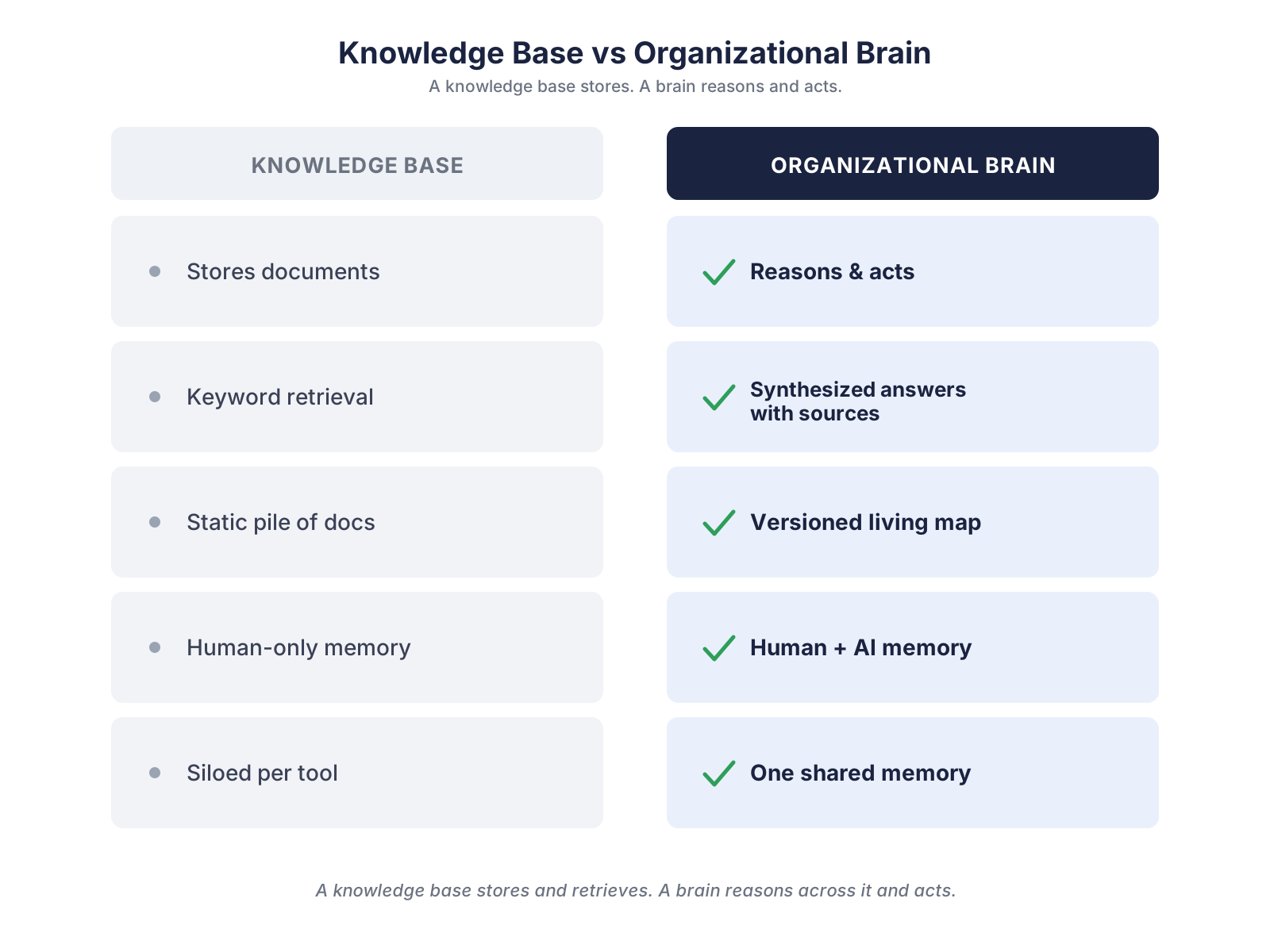
- A knowledge base stores and retrieves. An organizational brain reasons and acts.
- Search gives you keyword matches. A brain gives you a synthesized answer with its sources.
- A wiki is a pile of static docs. A brain is a versioned, living map that never silently loses or overwrites anything.
- Your current tools each remember in their own silo. A brain is one shared memory the whole company and its agents draw from.
This isn’t a fringe idea anymore.
The framing of a “company brain” as the missing primitive for AI-native companies has moved into the mainstream startup conversation, where it’s increasingly described as engineering’s next competitive moat, as Falconer’s guide lays out.
The reason is blunt.
AI agents don’t fail because the models are weak.
They fail because they have no company context to stand on.
Why Companies Have Data but No Memory
Walk into almost any company and you’ll find the same thing.
Knowledge lives in two places: inside people’s heads, and scattered across a dozen tools that each remember separately.
Slack remembers the conversation.
Drive remembers the file.
The CRM remembers the deal.
None of them remember how the company actually works.
So when a key person leaves, months of methodology walk out the door with them.
Every new hire gets re-onboarded from zero, by a human, over weeks.
And every AI tool you plug in starts cold, because there’s no shared context for it to reason from.
That’s the gap.
Not a lack of data, a lack of memory.
The Architecture: One Main Repo, One Repo Per Department
Here’s the structure we landed on, and it’s simpler than it sounds.
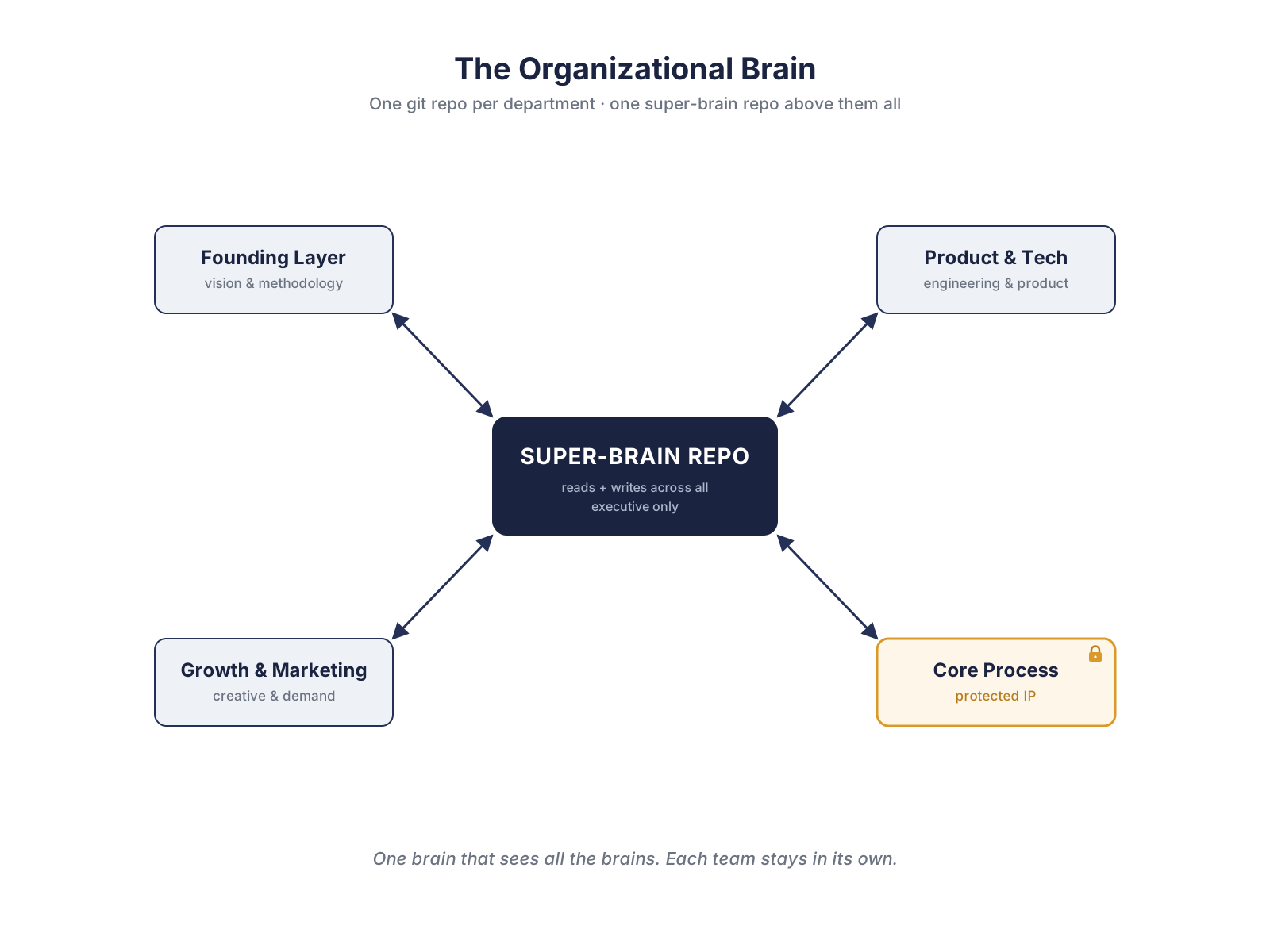
Each department gets its own repository.
Think of each repo as that department’s brain.
The founding layer has a repo for vision, methodology, and how the company operates.
Product and engineering has its own.
Growth and marketing has its own.
And the sensitive core process, the company’s real intellectual property, gets its own protected repo with the tightest access.
Now, why separate repos instead of one big repo with folders?
Two reasons, and I’ll give you the exact way I think about it.
The first is access control.
To put it the way I said it on that call: we don’t want everyone exposed to everything.
A single shared folder gives every person access to all of it, which is wrong for a company.
The second reason is that it mirrors how the company already works.
When I build a marketing brain for one client, that repo holds an engine that generates creative, video, graphics, the marketing stuff.
If I then needed to add an HR area for them, I’d put it in a separate repo.
It’s just more architecturally correct.
The boundaries in the repos should match the boundaries in the org.
Then comes the piece that ties it together.
Sitting above all the department repos is one admin repo that can read and write across every one of them.
Only the technical lead and an executive can reach it.
The cleanest way I’ve found to describe it out loud: it’s a super-brain connected to many other brains.
It’s the one brain that can see all the brains, while every team still only works inside its own.
That’s the whole map.
A hub that sees everything, spokes that each stay in their lane.
Why Per-Department Repos Beat One Big Repo
If you’ve ever managed permissions in a shared drive, you already feel this.
The mono-repo-with-folders approach forces you to bolt access control onto a structure that wasn’t built for it.
Per-department repos give you clean ownership and real “who sees what” by default.
The marketing person never has to worry about touching, or seeing, the protected IP.
The structure handles the boundary, so the human doesn’t have to.
Everyone Becomes a Developer (But Not Really)
This is the part people don’t believe until they see it.
A whole company of non-engineers, contributing to a Git-based brain, without learning to code.
First, let me kill the fear that the word “Git” creates.
GitHub is just a shared drive that never forgets and never overwrites.
It holds the code, and the AI makes it accessible.
That’s the entire mental model a non-technical person needs.
Here’s a real example.
I work with a woman in her sixties at one of the largest real estate companies in the country, building a platform to manage tenants.
She has never been a developer.
She connects to GitHub, I tell her where to click, and her Claude Code handles the actual work.
She only needs to understand one thing: GitHub holds her code, and everything else is on Claude Code, whose job is to make it accessible.
That’s it.
So here’s the loop a non-developer actually runs to feed the brain:
- They git pull to get the latest version of their department’s brain.
- They talk to Claude Code in plain language, something like “add what we decided about the new pricing tier.”
- Claude shapes that into the right Markdown file, in the right place.
- They commit, and now the change is saved for everyone.
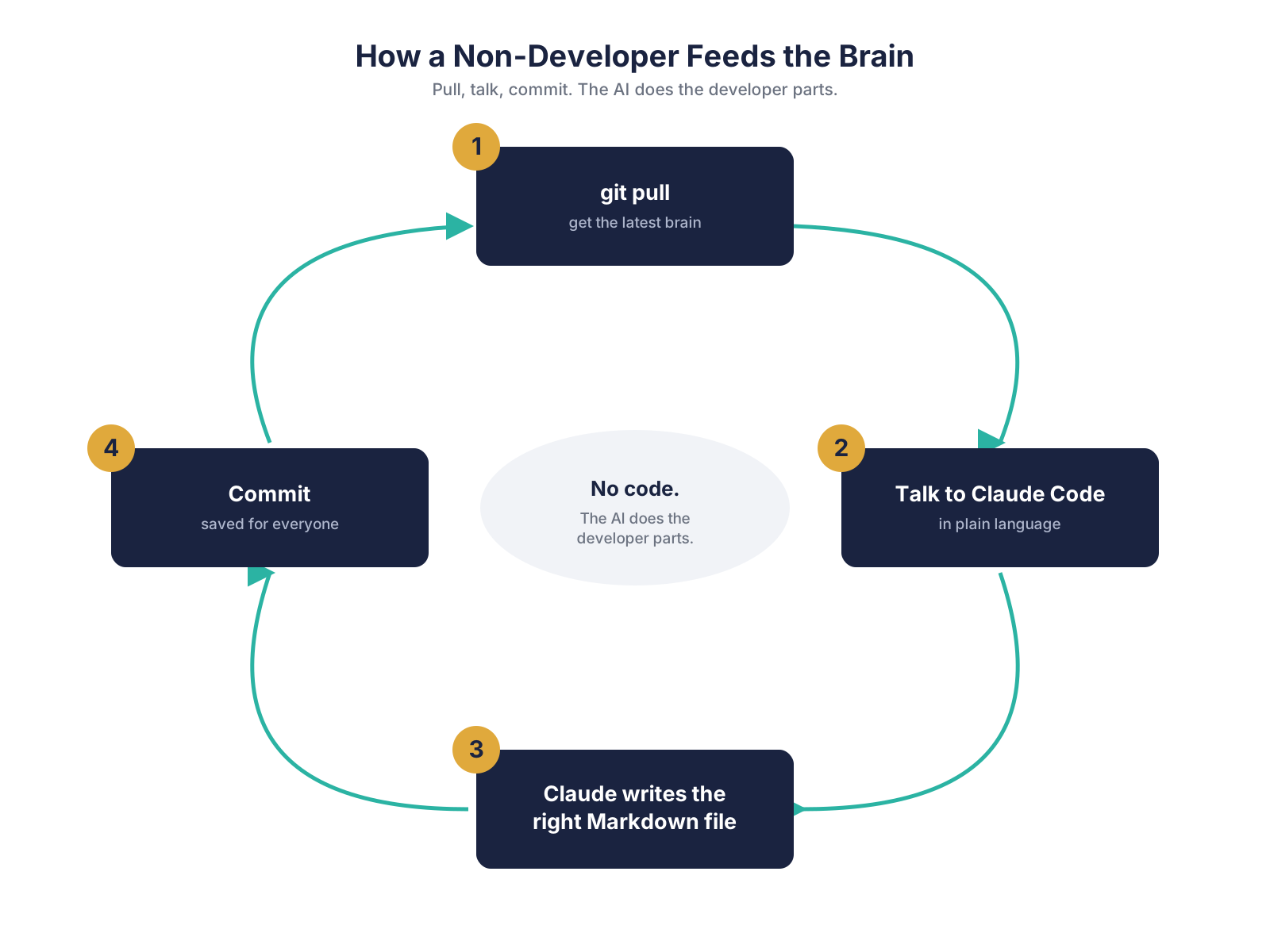
No code.
They look like developers.
They’re operators with an AI doing the developer parts.
That’s what makes this reachable for an entire organization instead of just the engineering team.
The Karpathy LLM Wiki Pattern Behind It
None of this is invented from nothing.
It descends from a pattern Andrej Karpathy described: instead of doing retrieval over a pile of raw documents, you build yourself a brain as interlinked plain-text files that an LLM maintains and reasons over.
People have been building personal versions of this with Claude Code, documenting the LLM wiki pattern as they go.
The reason Markdown is the substrate is that it’s the one format that’s human-readable, version-controllable, and AI-parseable all at once, a principle some teams now treat as an explicit axiom: knowledge is Markdown.
An organizational brain is simply that personal pattern, scaled from one person to a whole company.
One brain becomes many brains, with a super-brain on top.
The Payoff: Onboarding That Drops From Weeks to Hours
Remember the fear we started with.
A new hire, and someone has to explain months of methodology by hand.
When the brain exists, that day looks completely different.
The new hire’s first hour is “read the onboarding file for your department,” and then the AI answers their questions using the brain, with citations back to the source.
This isn’t theoretical.
Engineering teams that moved their knowledge into an AI-readable Markdown base have reported onboarding dropping from weeks to hours, with new people reading the knowledge base while the AI answers the rest with sources.
That’s the deliverable that kills the original fear.
Not a document nobody reads.
A brain that onboards for you.
How to Start Building Your Own Organizational Brain
If you want to build one, here’s the honest starting path.
First, pick the substrate: Markdown for the files, a Git host like GitHub to store them, and Claude Code as the AI that reads and writes them.
Second, map your departments to repos: one per business unit, named for what they own.
Third, stand up the super-brain repo, the admin one that reads across all the others, and lock its access to your technical lead and an executive.
Fourth, get one real thing into each repo, the fastest way being to ask each person for one thing they know that nobody else has written down.
Fifth, build the first onboarding file per role, so the next hire reads instead of being told.
Now the honest part about timing.
If you’re under about five people, it’s too early, you don’t have enough shared knowledge to organize yet.
If you’re past fifty, it’s harder, the knowledge is already siloed and capturing it gets politically expensive.
The sweet spot is roughly 10 to 50 people, pre-scale, while the knowledge is still capturable.
This is the work I do.
I build organizational brains for companies, and I advise teams that want to build their own.
The architecture above is yours to take and run with.
The help is for when it gets hard, when you’re standing up the access model, deciding local versus cloud, or trying to get non-technical people contributing without it falling apart.
One last thing, because it’s my favorite proof that this works.
The session where I teach a team to build their brain, I build by running the recording of our planning call through my own Claude Code skill, which turns it into the material.
The thing I’m teaching is the thing that made the thing I’m teaching with.
That’s the whole idea of an organizational brain in one move.
FAQs
What is an organizational brain?
It’s a version-controlled, plain-language memory of how a company works that both people and AI can read and update.
It differs from a wiki or search because it’s a living, reasoned-over map, not a static document store.
How is an organizational brain different from a knowledge base?
A knowledge base stores and retrieves documents.
An organizational brain is structured so an AI can reason across it and act on it, and it’s versioned in Git so nothing is ever lost or silently overwritten.
Can non-developers use Git?
Yes.
With Claude Code, a non-technical person only needs to git pull and then describe changes in plain language, and the AI does the actual file editing.
GitHub behaves like a shared drive that never forgets or overwrites.
Should we use one repo or one per department?
For most small companies, one repo per department plus a single executive “super-brain” repo wins.
It gives clean ownership and real access control, which a single folder-based repo can’t.
What is the Karpathy LLM wiki pattern?
It’s Andrej Karpathy’s idea of building a brain as interlinked plain-text files that an LLM maintains, instead of doing retrieval over raw documents.
An organizational brain is that pattern scaled from one person to a whole company.
When is a company ready to build an organizational brain?
Roughly 10 to 50 people.
Earlier, there isn’t enough shared knowledge to organize, and later, the knowledge is already siloed and harder to capture.
Sources
- Falconer — What is a company brain? Why it’s engineering’s next competitive moat
- Mark Chen (Medium) — I Used Claude Code to Build a Personal Knowledge Base, Inspired by Karpathy’s LLM Wiki Pattern
- The AI Agent Factory (Panaversity) — Axiom: Knowledge is Markdown
- Clearwater Analytics Engineering (Medium) — Building an AI-Powered Markdown Knowledge Base System for Your Engineering Team
- Analytics at Meta (Medium) — How We Built an AI Second Brain for 60K Knowledge Workers
Thousands of builders are already inside. Questions, builds, and what actually works.
Claude Cowork vs Claude Code: Which One Should You Use? (2026)
Same engine, different steering wheel. A builder's honest breakdown of Claude Cowork vs Claude Code: pricing, real token costs, and which to actually pick.
How to Run AI Agents in the Cloud 24/7: Local vs VPS vs Managed (and the BYOK Move That Cuts the Cost)
Local, VPS, or managed? The true cost of running an AI agent 24/7, including the token bill nobody mentions, and how BYOK cuts it 60 to 80 percent.
איך מריצים סוכני AI בענן 24/7: מקומי מול VPS מול מנוהל, והמהלך של BYOK
מקומי, VPS, או מנוהל? העלות האמיתית של הרצת סוכן AI מסביב לשעון, כולל חשבון הטוקנים שאף אחד לא מזכיר, ואיך BYOK חותך אותו ב60 עד 80 אחוז.