How to Turn Meeting Transcripts Into a Knowledge Base (the Working 5-Layer System)
Yesterday I sat in a 68-minute meeting at a client’s office.
We talked about bots, demoed a system, closed some decisions.
This morning, 8 content ideas from that meeting were waiting on my machine.
One of them is the article you’re reading right now.
That’s not a writing trick.
It’s the output of a system I run every day, and it points at the most underused data asset almost every business owns.
You’re probably already recording meetings.
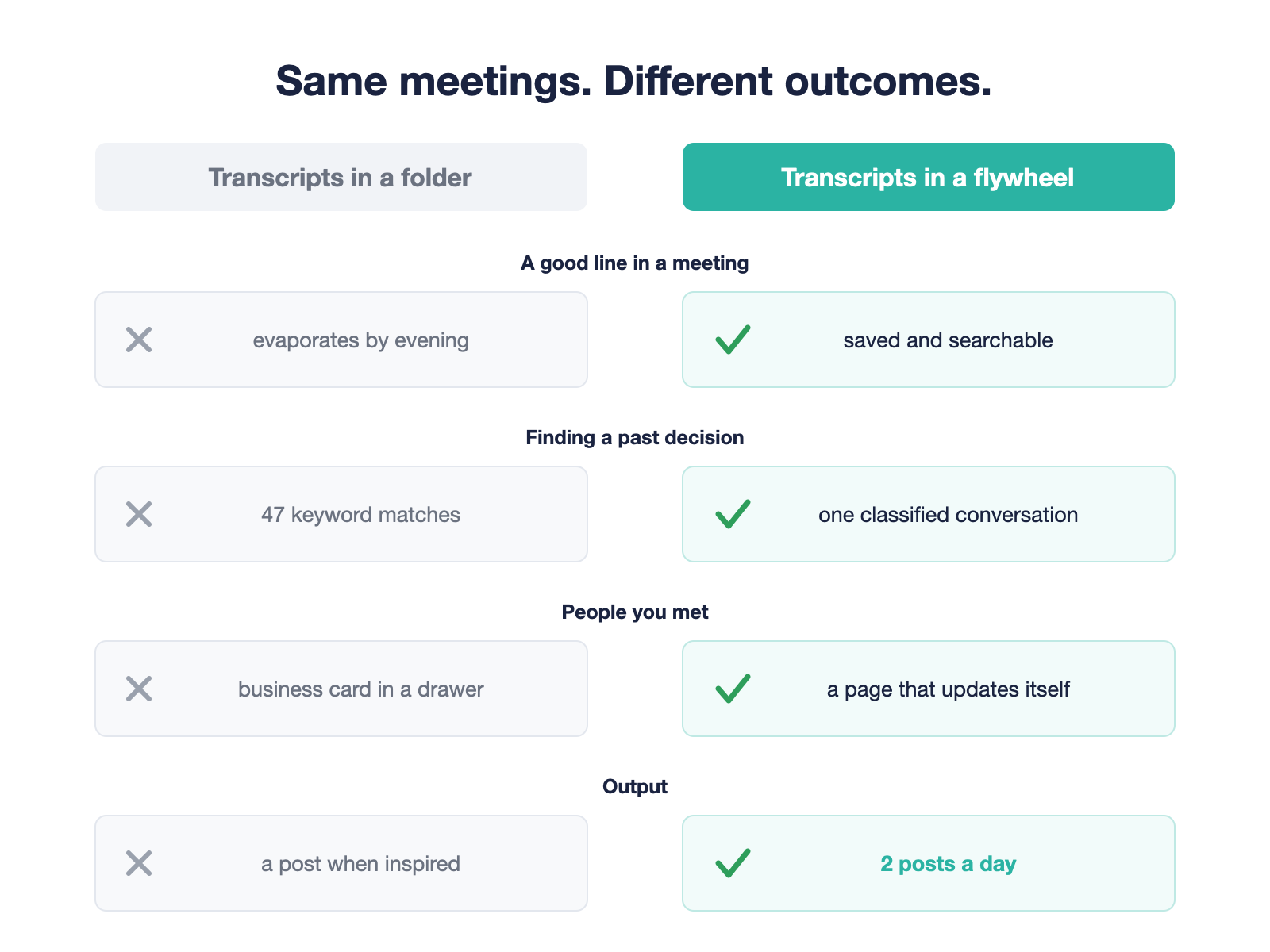
Your AI notetaker generates a summary, somebody skims it once, and the transcript goes to a folder where nothing ever happens to it.
The problem was never recording.
The problem is that nothing happens after.
This article shows you the full system I use to turn meeting transcripts into a knowledge base: the exact layers, the real numbers, and the version you can start this week.
Key Takeaways
- Transcripts compound only when they’re classified, not just stored. Search finds words. Categories find meaning.
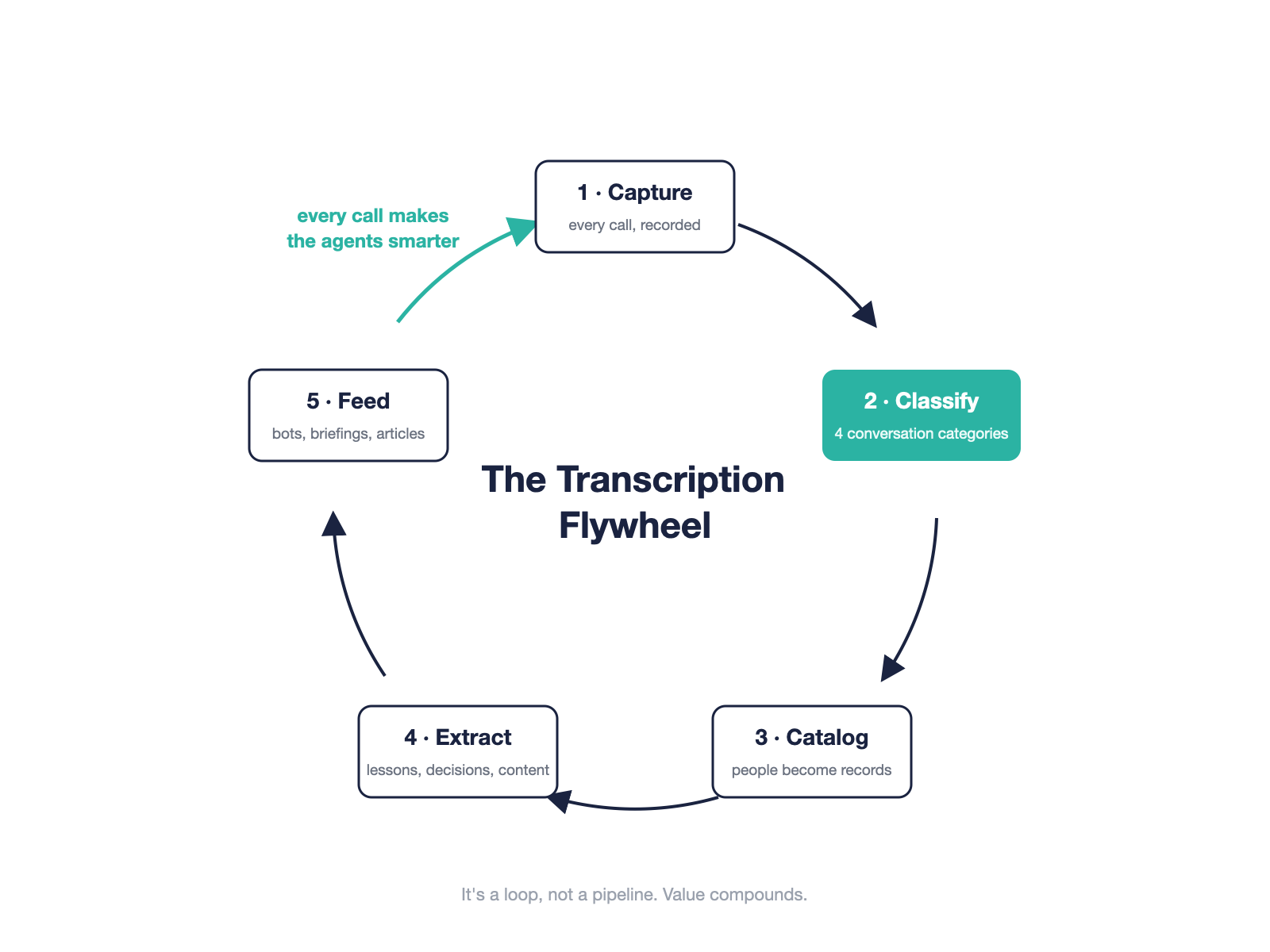
- The working system has 5 layers: capture, classify, catalog, extract, feed.
- You don’t need a vector database to start. Plain text files in folders work, and they’re easier to fix.
- The machine’s real edge is exhaustiveness, not intelligence. It reads 100% of the record. You teach it what matters.
- Every downstream agent you build later, from a support bot to a briefing tool to a content engine, feeds from the same base.
- Start with the meetings you already record. Layer 1 costs you nothing new.
Why Transcripts Die in Folders (and Summaries Don’t Help)
Here’s the failure mode I see in almost every company I work with.
They turned on an AI notetaker months ago.
Every call produces a tidy summary with action items.
The summary gets read once, the same day, by the person who was in the meeting anyway.
Then it’s buried.
Six months of conversations with customers, candidates, and partners, and when you need to know why a decision was made, you’re searching a pile of text files for a word you hope someone said.
Search is the wrong tool for this.
Searching “pricing” across your transcripts returns 47 mentions of pricing, in no order, with no sense of which conversation was a sales call and which was a vendor negotiation.
You wanted to know what to do with meeting transcripts.
Search gives you back the haystack.
This is why “organizational intelligence” stays a buzzword in most of the articles you’ll find on this topic.
Intelligence doesn’t come from storing conversations.
It comes from the step everyone skips: classification.
The 5-Layer System, End to End
Here’s the system I run, layer by layer.
It’s the same AI meeting transcription workflow I build for clients, and the same one producing this article.
Layer 1: Capture Everything, Live and Remote
The capture layer is the boring one, and it’s the only one most companies have.
Most meeting transcription knowledge management advice stops right here, at the AI notetaker, which is exactly why it disappoints.
For remote calls I use Spinach AI, an AI notetaker that joins my Zooms automatically, even when I’m not on the call myself.
Otter, Fireflies, and the other notetakers do the same job.
The tool matters much less than the coverage.
For live, in-person meetings I record on my phone and push the audio in afterward.
One rule: if a conversation matters to the business, it gets captured.
People sometimes ask if all this recording makes us mentally lazy.
Honestly, maybe a little.
The way Waze made us slightly worse navigators.
What I notice in practice, though: knowing the transcript is being captured frees me from trying to remember the meeting while I’m in it.
I’m fully present for the creative part, and my system catches everything I say.
Nobody goes back to paper maps.
Layer 2: Classify With a 4-Category Taxonomy
This is the layer that turns a pile into a knowledge base.
Every transcript that comes in gets classified into one of four categories: sales, consulting, upsell, or business development.
Why categories and not tags or search?
Because every useful question you’ll ever ask your meeting archive starts with “what kind of conversation was this.”
What objections come up in sales calls?
What did we promise in consulting sessions?
Which existing clients mentioned new needs?
A category answers the first half of the question before you’ve asked it.
Your taxonomy will look different.
A product company might use discovery, support, partnership, internal.
The number matters more than the labels: 3 to 5 categories, no more.
Layer 3: Catalog People Into a Self-Building CRM
Every person who appears in a transcript gets a page.
Each new conversation updates it: what they asked about, what stage they’re at, what they care about.
I didn’t set out to build a CRM.
But after enough transcripts, that’s exactly what this layer is.
A CRM that fills itself in from conversations, instead of nagging a salesperson to type notes they half-remember.
When someone calls me back after three months, I read their page before the call.
Two minutes, full context, nothing forgotten.
Layer 4: Extract Lessons, Decisions, and Content
Each category gets its own extraction rules.
From consulting sessions, my system pulls teaching lessons: things I explained out loud that are worth keeping.
From sales calls, objections and what answered them.
From every meeting, decisions and commitments.
And from all of it, content ideas.
My teaching-lessons database currently holds 203 entries, every one of them anchored to something I actually said, in a real conversation, with a date and a timestamp.
That’s the part people don’t expect: your transcripts are a content mine.
You explain your best thinking out loud all day, to clients, in the language they actually understand.
Extraction is how it stops evaporating.
Layer 5: Feed Your Agents From the Same Base
This is where it compounds.
Once the knowledge base exists, everything you build next reads from it.
A support bot answers from your real support conversations.
A briefing tool prepares you for meetings from your real relationship history.
A content engine drafts in your real voice, from things you really said.
This is also where the architecture question comes up, and my answer is unfashionable: plain markdown files, organized in folders.
There’s a growing camp arguing that for this kind of knowledge work, simple text files that link to each other beat heavyweight retrieval pipelines.
The pattern is often credited to Andrej Karpathy’s LLM-wiki idea, and you can see a working build of it in Mark Chen’s write-up.
No more retrieval pipelines for a starting team.
Just a lot of text files, connected to each other, that a model can read directly.
I’ve written a full guide to that architecture, including how to structure one repository per department, in How to Build an Organizational Brain.
When you sell the whole loop to yourself or your team, here’s the one-sentence version I use with business owners: the system learns from every call you make.
Every day of conversations feeds it.
The bot gets stronger and smarter, daily, from work you were doing anyway.
The Numbers From My Own System
Articles about meeting knowledge bases never show numbers.
I went and counted mine this morning.
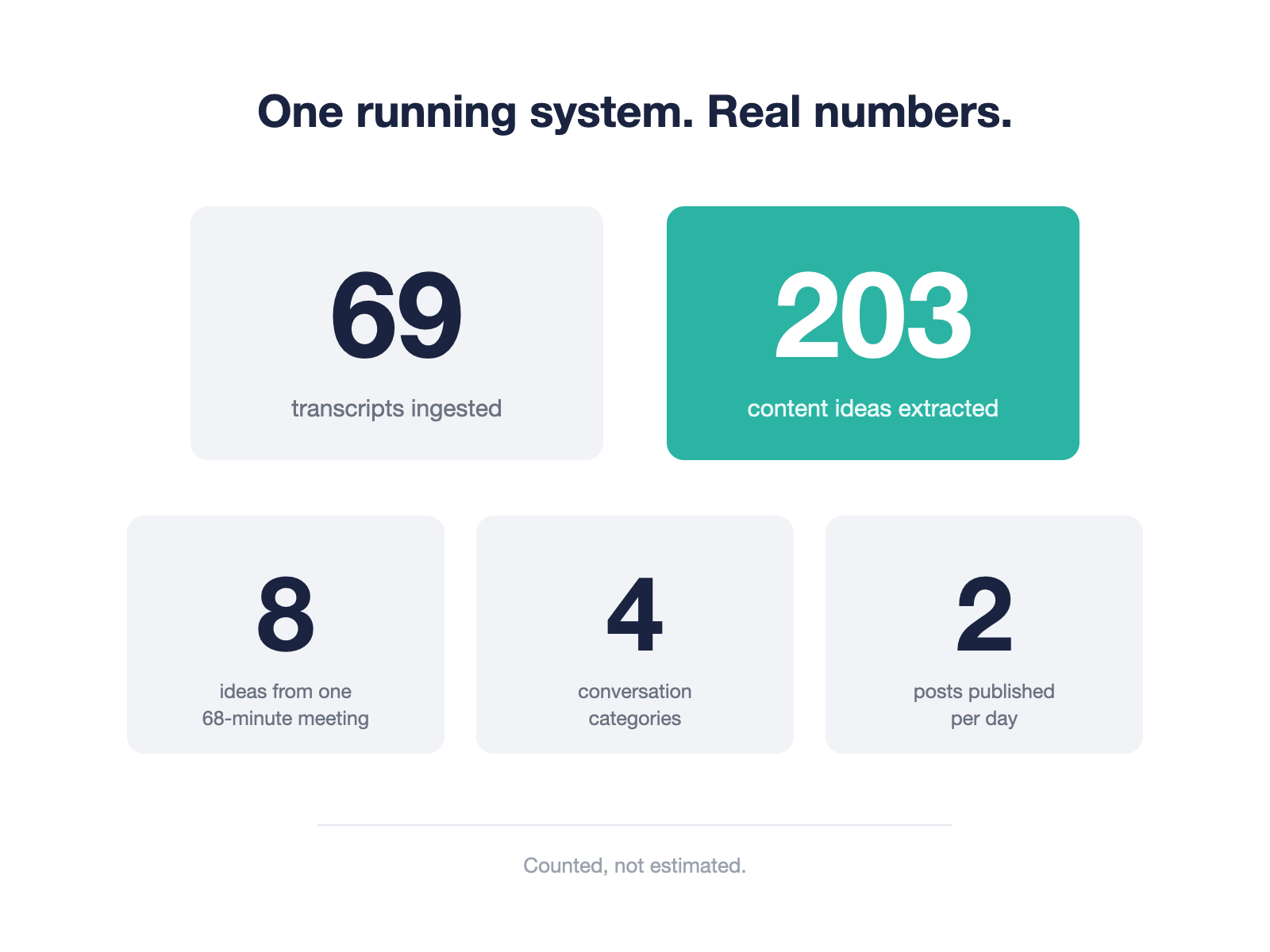
- 69 transcripts ingested into the knowledge base
- 203 content ideas extracted and stored, each traceable to a real conversation
- 4 classification categories covering every business conversation I have
- 8 content ideas extracted from one 68-minute meeting, yesterday
- 2 posts published per day, fed by this pipeline
One honest limitation, because you should hear it from someone who runs this.
Classification and extraction are only as good as the rules you write.
The system improves because I maintain it: when an extraction misses something I needed, I update the rule.
It’s a garden, not a vending machine.
Exhaustive Beats Smart: Why This Works When “AI Search” Disappoints
You’ve seen “AI-powered knowledge” pitches before, and you’re right to be skeptical of most of them.
So let me give you the honest version of why this works.
Skip every claim that the AI “understands your business.”
The machine’s real, defensible edge is that it reads all of the information, every transcript, every time.
That’s something no human can do.
Nobody on your team re-reads 69 transcripts before a meeting.
The machine does, in seconds, without getting bored.
What counts as important is the part you teach it, and there’s a simple loop for that.
I saw it working at a fund I work with: the operating team noticed their senior partner kept asking the same question about every meeting briefing, so they added it as a standing extraction rule.
Now every briefing answers it before he asks.
Every question your system can’t answer is a free, validated feature request.
Add it as a rule, and the institutional memory from meetings compounds instead of resetting.
That’s the honest mechanism behind “it gets better over time.”
Not model magic.
Harvested questions.
Once It’s Running: Three Real Deployments
Three meeting-driven knowledge base deployments I’ve built or advised on, so you can see the range.
A 13-year-old B2B services company runs its support and sales calls through this exact loop.
Their transcripts feed a knowledge base, and the knowledge base feeds their customer-facing bots.
Every support call a human answers today trains the bot that answers tomorrow’s.
A venture capital fund uses the same architecture for meeting preparation.
Years of CRM interactions, classified and cataloged, generate a briefing before every partner meeting.
The work that used to be genuinely impossible by hand now takes minutes.
And a 10-person startup runs the lightweight version.
In our first working session, the CEO stopped me with a sentence I think about a lot: “You’re talking too technical. I lost you.”
So we changed the model.
Nobody on the team learns the tooling.
Everyone records their meetings, and one builder maintains the brain and ships each department its tools from their own transcripts.
That’s the honest division of labor, and it’s the part I do for companies.
I build these transcription-fed knowledge systems end to end for non-technical teams, and I advise builders who are implementing their own.
If you want it built rather than explained, that’s the work I do with clients.
Start This Week: The Minimum Viable Version
You don’t need a platform, a budget, or an engineer to start.
You need five decisions.
- Turn on your notetaker for every call, today. If a meeting matters, it gets captured.
- Pick 3 or 4 conversation categories that match your business. Sales, delivery, partnerships, internal is a fine start.
- Create one folder per category and save transcripts as plain markdown files. No database, no embeddings. When you’re ready for the full architecture, the organizational brain guide covers the repo-per-department version.
- Write your first 3 extraction questions. What did we commit to? What objection came up? What did I explain that’s worth keeping?
- Put a date in your calendar 30 days out, and count what you’ve collected.
Thirty days from now you’ll have a small, classified, growing record of every conversation your business had.
That’s a knowledge base.
Everything else is layers on top.
Your meetings are already happening.
The transcripts are already piling up.
The only question is whether they keep evaporating or start compounding.
FAQs
What’s the best way to organize meeting transcripts?
Categories first, people second, dates third.
Classify every transcript by conversation type (sales, delivery, partnership), then maintain a page per person that updates from each new transcript.
Date-based folders alone are where transcripts go to die.
Do I need a vector database to build a meeting knowledge base?
No.
Plain text files organized in folders are enough to start, and they’re easier to inspect and fix than an embedding pipeline.
Structure beats infrastructure at this stage; add heavier tooling only when scale forces you to.
Is it OK to record every meeting?
Get consent, follow your region’s recording laws, and announce the notetaker.
In practice people are far more comfortable with a visible bot in the meeting than with someone pulling out a recorder mid-conversation.
Keep genuinely sensitive conversations out of the system entirely.
How is this different from what Otter or Fireflies already do?
The notetakers handle layer 1: capture and summarize.
The value lives in the layers after: classification, people cataloging, extraction, and feeding downstream agents.
That’s the part no off-the-shelf tool does for you, because your taxonomy and your extraction rules are specific to your business.
Sources
- Spinach AI — AI Meeting Agent
- Mark Chen (Medium) — I Used Claude Code to Build a Personal Knowledge Base, Inspired by Karpathy’s LLM Wiki Pattern
- IceCubes — Building a Meeting-Driven Knowledge Base for Your Organization
- PlainEnglish — 6 AI Prompts to Turn Meeting Transcripts into Actionable Organizational Intelligence
Thousands of builders are already inside. Questions, builds, and what actually works.
Claude Cowork vs Claude Code: Which One Should You Use? (2026)
Same engine, different steering wheel. A builder's honest breakdown of Claude Cowork vs Claude Code: pricing, real token costs, and which to actually pick.
How to Run AI Agents in the Cloud 24/7: Local vs VPS vs Managed (and the BYOK Move That Cuts the Cost)
Local, VPS, or managed? The true cost of running an AI agent 24/7, including the token bill nobody mentions, and how BYOK cuts it 60 to 80 percent.
איך מריצים סוכני AI בענן 24/7: מקומי מול VPS מול מנוהל, והמהלך של BYOK
מקומי, VPS, או מנוהל? העלות האמיתית של הרצת סוכן AI מסביב לשעון, כולל חשבון הטוקנים שאף אחד לא מזכיר, ואיך BYOK חותך אותו ב60 עד 80 אחוז.