How to Run AI Agents in the Cloud 24/7: Local vs VPS vs Managed (and the BYOK Move That Cuts the Cost)

How to Run AI Agents in the Cloud 24/7 (Without a DevOps Headache)
You built an agent that actually works.
It reads your email, runs your scripts, pings you on Telegram when something needs you.
Then you close your laptop, and it dies.
That’s the wall every builder hits the moment an agent stops being a toy.
A real agent has to keep working when you’re asleep, on a flight, or just not at your desk.
This is a guide to the three real ways to run an AI agent in the cloud 24/7, what each one actually costs, and the one move that keeps the cost from quietly eating you alive.
I’ll show you the part almost nobody talks about.
Key Takeaways
- There are three ways to run an agent 24/7: your own machine, a self-hosted VPS, or managed hosting.
- Local is cheap on paper but unreliable; a VPS is cheap on paper but costs you hours; managed is the move for most builders.
- The cost everyone forgets is the token bill, the model usage, not the server.
- BYOK (bring your own API key) cuts that bill 60 to 80 percent by removing the platform’s markup.
- For a builder who wants it running today with the cost under control: a managed dedicated VM plus BYOK.
What “Running an Agent 24/7” Actually Means
24/7 is not just “leave it on.”
A real always-on agent needs four things, and a laptop fails all four.
It needs always-on compute, so the machine never sleeps.
It needs automatic crash recovery, so a hiccup at 3am restarts itself instead of waiting for you.
It needs persistent memory, so the agent remembers its state across restarts instead of starting from zero.
And it needs a channel to reach you, like Telegram, WhatsApp, or Discord, so it can act and report while you’re away.
Your laptop sleeps, drops Wi-Fi, reboots for updates, and forgets everything when the process dies.
That’s why “run AI agents in the cloud 24/7” is really a question about where the agent lives, not whether you remember to keep it open.
The Three Ways to Run an AI Agent 24/7
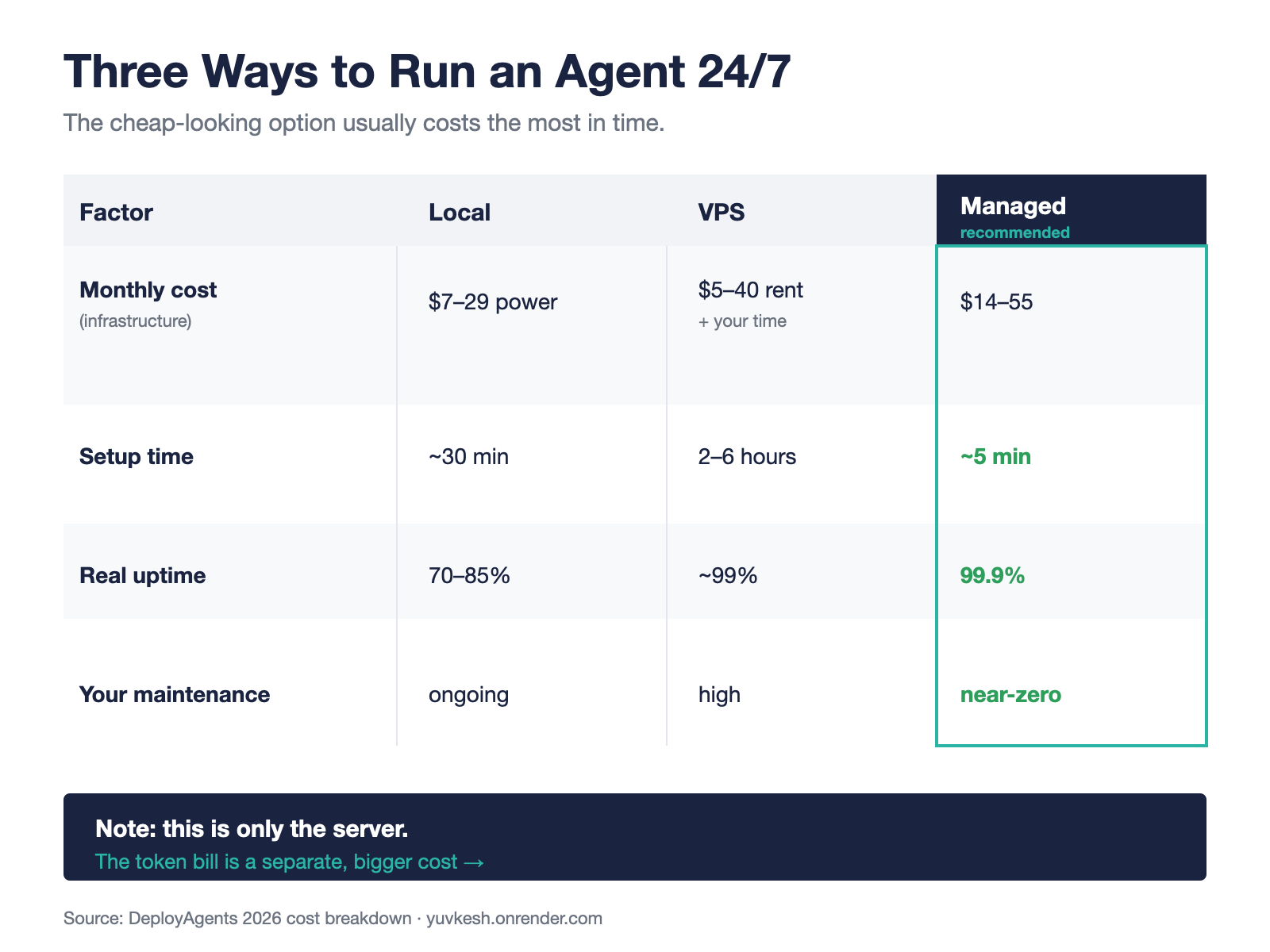
Here’s the whole map before we go deep.
You can run it on your own machine, which is free-ish and fine for building but not for running.
You can rent a VPS and self-host, which is cheap to rent but expensive in your time.
Or you can use managed hosting, which costs a bit more in dollars and almost nothing in hours.
For most builders the answer is managed hosting plus your own API key, and the rest of this article is why.
Option 1: Your Own Machine (Local)
This is where most agents start, and it’s the right place to start.
You run the agent on your laptop or a spare Mac mini, you iterate fast, you see everything.
The problem is reliability, not price.
A machine running 24/7 adds roughly 7 to 29 dollars a month to your electricity bill, plus hardware wear, and real-world uptime sits around 70 to 85 percent once you count sleep, reboots, and dropped connections, according to a 2026 cost breakdown by DeployAgents.
Local is perfect for development.
It’s a bad place to run anything you actually depend on.
Option 2: Self-Hosted VPS
The next step most people take is renting a small cloud server.
You grab a box from Hetzner, DigitalOcean, or Linode, install Docker, set up a process manager, and your agent runs on a machine that never sleeps.
The rent is genuinely cheap, often 5 to 40 dollars a month.
The honest cost is your time.
DeployAgents puts the real cost of a self-managed VPS at 120 to 240 dollars a month once you price in 2 to 6 hours of setup and ongoing maintenance for updates, HTTPS, networking, and the inevitable 11pm troubleshooting.
A VPS is the right call if you want full control and you actually enjoy running your own infrastructure.
If you don’t, you’ve just signed up for a second job.
Option 3: Managed Hosting (What I Actually Run)
Managed hosting runs the agent on someone else’s infrastructure so you don’t touch a server.
You configure the agent in a UI, click deploy, and it’s live in about five minutes with automatic restarts and high uptime.
This is what I actually run, and the platform I use is ClawBud.
ClawBud runs OpenClaw, the open-source operator agent, on a dedicated virtual machine with its own firewall, not a shared container where you’re stacked next to strangers.
That isolation matters when your agent can touch your files, your inbox, and your API keys.
It also runs the coding agents I live in, including Claude Code, on that same always-on machine, so my workflows keep going whether my laptop is open or not.
The honest tradeoff is that you give up some of the raw control a bare VPS gives you.
For me that trade is obvious: a few dollars and zero maintenance beats a weekend of Docker every time.
If you want to try it without committing, ClawBud has a free trial, which is the lowest-risk way to feel the difference between “my agent runs when I’m awake” and “my agent runs.”
The Cost Nobody Talks About: Your Token Bill
Here’s the part every other guide skips.
They all price the server, then stop.
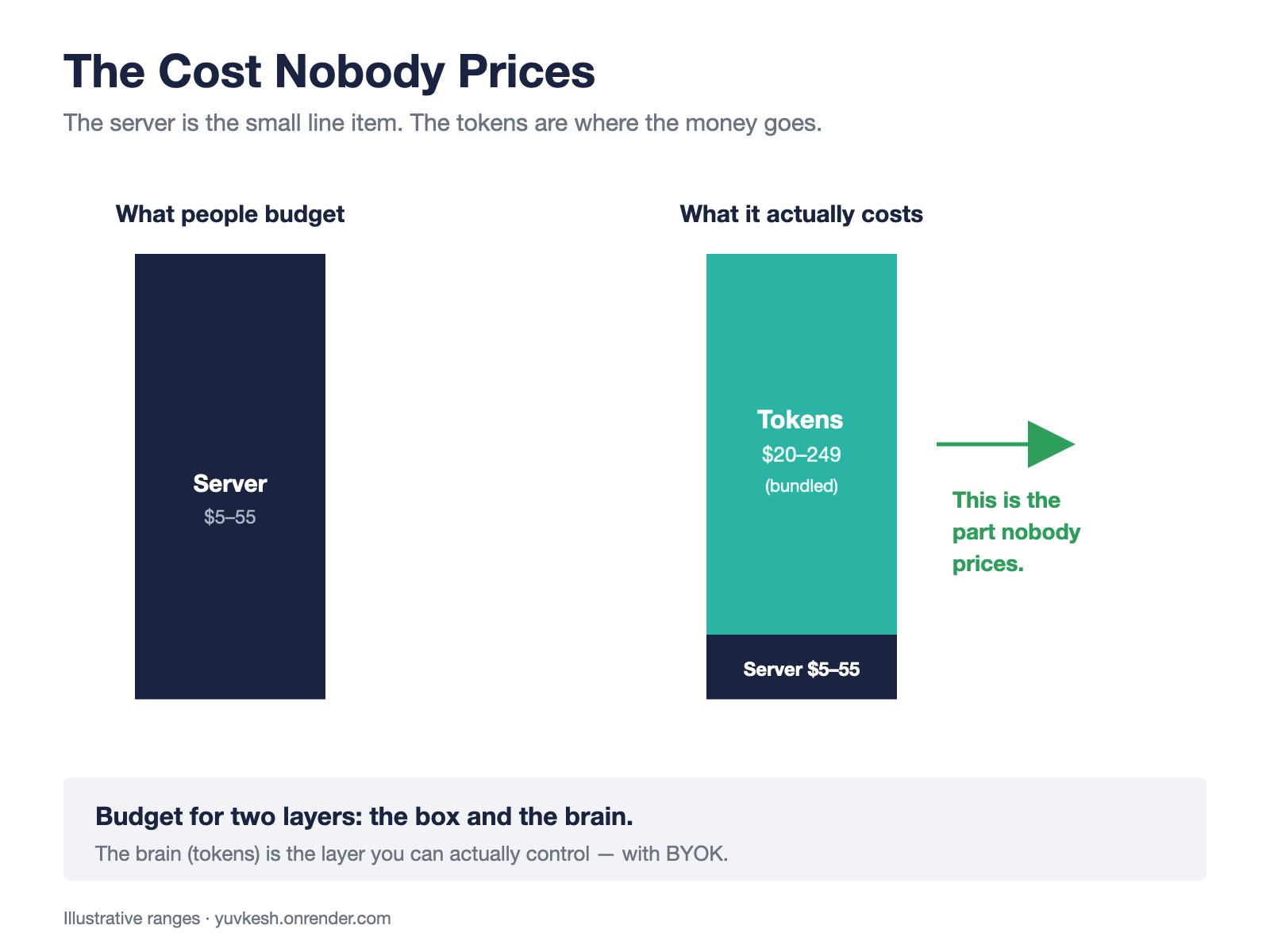
But the server is the small line item.
An always-on agent is always listening, always reasoning, always calling tools, and every one of those calls burns tokens.
The dominant cost of a 24/7 agent is model usage, not infrastructure.
You can run the agent on a 5-dollar VPS and still spend 80 dollars a month on the model behind it.
The DeployAgents cost deep-dive prices local, VPS, and managed in detail but never prices the LLM usage at all, and that’s the norm across the whole category.
So when you budget for running an agent in the cloud 24/7, budget for two layers: the box, and the brain.
The box is cheap and predictable.
The brain is where the money actually goes, and it’s the layer you can control.
BYOK: The One Move That Controls the Cost
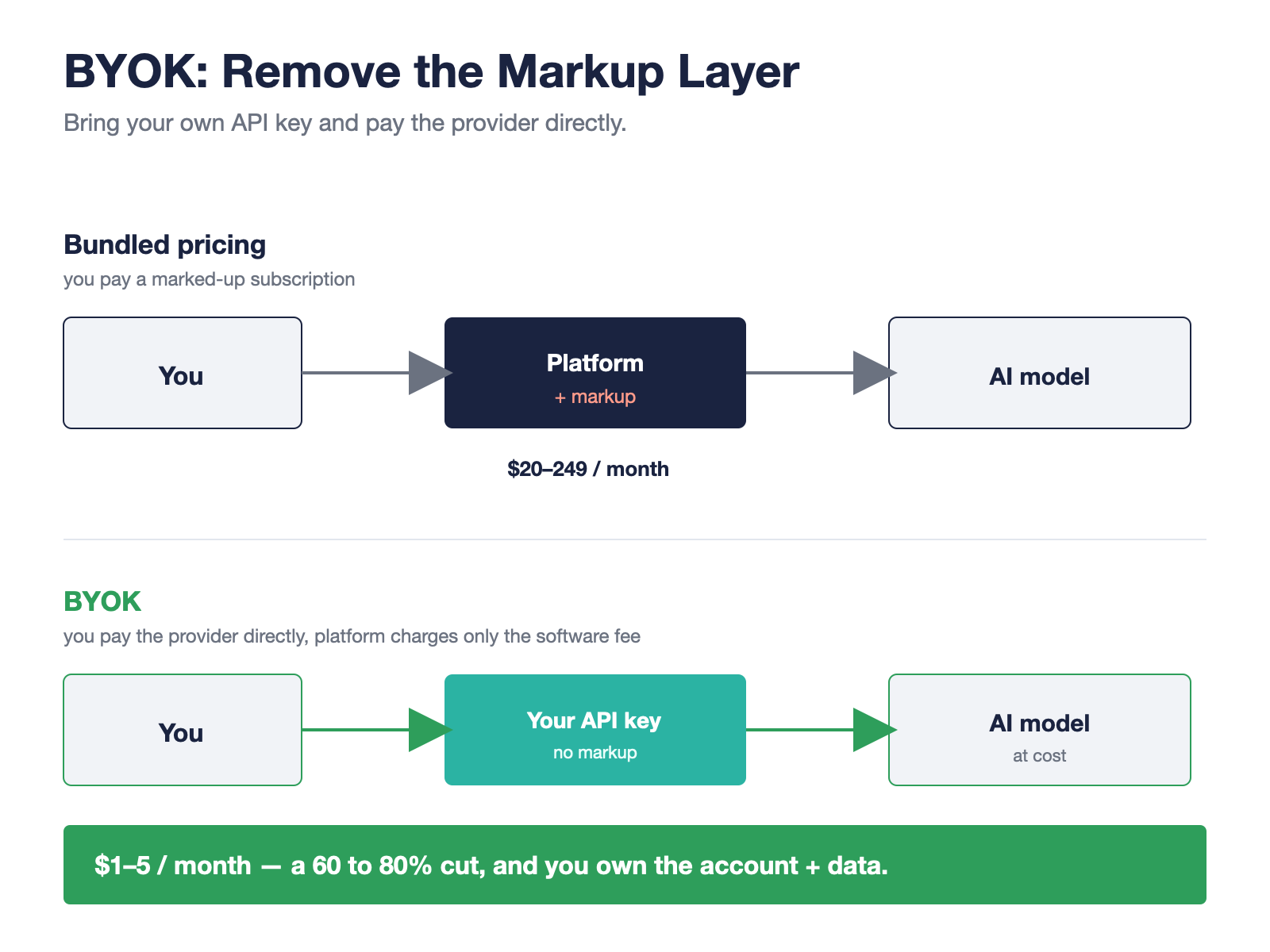
BYOK stands for “bring your own key.”
Instead of a platform bundling AI usage into its price and marking it up, you create your own API key directly with the provider, like Anthropic or OpenRouter, and connect it to the tool.
The platform charges you for the software layer only, and the model usage flows straight to your own provider account at cost.
The savings are not small.
Most BYOK users pay 1 to 5 dollars a month in real API costs instead of 20 to 249 dollars in bundled subscriptions, a 60 to 80 percent cut on the layer that dominates your bill, as laid out in guides like xReply’s breakdown of BYOK and Chatsistant’s pricing docs.
The money isn’t even the best part.
With BYOK you own the account and the data, you can switch models whenever you want, and nobody can lock you in by sitting between you and the model.
This is exactly why I run on ClawBud’s BYOK plan: I bring my own Anthropic key, the agent runs on a dedicated VM, and I pay the provider directly instead of paying a markup to sit on top of it.
For a builder, that’s the whole game: own your key, own your agent, keep the cost honest.
Which One Should You Pick?
If you’re building and testing, stay local.
It’s free, it’s fast to iterate on, and reliability doesn’t matter yet.
If you want total control and you genuinely like running infrastructure, get a VPS and own the whole stack.
If you want your agent running today, reliably, with the cost under control, use managed hosting with your own key.
That’s a dedicated VM so your agent is isolated, plus BYOK so the model bill stays in your hands.
The builders who win aren’t the ones with the cheapest server.
They’re the ones whose agent is actually running while everyone else’s is asleep on a closed laptop.
Pick the option that gets yours running, bring your own key, and let it work.
FAQs
How much does it cost to run an AI agent 24/7?
The server ranges from about 5 dollars a month on a VPS to 14 to 55 dollars a month for managed hosting.
The bigger cost is usually the token bill, the model usage, which BYOK can cut to a few dollars a month instead of 20 or more bundled.
Budget for both layers, not just the server.
Can I run an AI agent without keeping my computer on?
Yes, that’s the entire point of cloud hosting.
Run it on a VPS or a managed platform and the agent stays alive whether your laptop is on or off.
What is BYOK and is it cheaper?
BYOK means bringing your own API key so you pay the AI provider directly with no platform markup.
It’s typically 60 to 80 percent cheaper on model usage, and you keep control of the account and the data.
Is a dedicated VM safer than a shared container?
A dedicated VM isolates your agent, so its files, keys, and firewall are yours alone, which matters for an agent with access to your accounts.
Shared containers are cheaper but mix multiple tenants on one machine.
Can I run Claude Code in the cloud 24/7?
Yes.
A VPS or a managed host can run Claude Code, and agents like OpenClaw, on an always-on machine so your workflows keep running remotely.
Sources
DeployAgents — Running AI Agents 24/7 in 2026: Local vs. Cloud vs. Managed — https://www.deployagents.co/blog/running-ai-agents-24-7-in-2026-local-vs-cloud Milvus — What Is OpenClaw? A Complete Guide to the Autonomous AI Agent — https://milvus.io/blog/openclaw-formerly-clawdbot-moltbot-explained-a-complete-guide-to-the-autonomous-ai-agent.md xReplyAI — What is BYOK? Bring Your Own Key — https://xreplyai.com/blog/what-is-byok Chatsistant — Bring Your Own Key (BYOK) and Pricing — https://docs.chatsistant.com/byok-pricing-guide
Thousands of builders are already inside. Questions, builds, and what actually works.
Claude Cowork vs Claude Code: Which One Should You Use? (2026)
Same engine, different steering wheel. A builder's honest breakdown of Claude Cowork vs Claude Code: pricing, real token costs, and which to actually pick.
איך מריצים סוכני AI בענן 24/7: מקומי מול VPS מול מנוהל, והמהלך של BYOK
מקומי, VPS, או מנוהל? העלות האמיתית של הרצת סוכן AI מסביב לשעון, כולל חשבון הטוקנים שאף אחד לא מזכיר, ואיך BYOK חותך אותו ב60 עד 80 אחוז.
ליצור שיר לילדים עם בינה מלאכותית: מדריך לקליפ מונפש בדקות
הפכתי ארוחה שהילד סירב לאכול לקליפ מונפש שלם בכמה דקות עם ChatGPT, Suno, Claude ו-Midjourney. מדריך פשוט שלב אחר שלב והרעיון מאחורי זה.